
Budget Activity
**wss 1/12/23
Budget Activity (AKA Budget Approval)

The Budget Activity module can be used to provide a hierarchical approve/rejection mechanism for controlling a decentralized budget process. Its use is not mandatory, and if left unconfigured it will have no impact on your budgeting process.
Approval Hierarchy is defined in the Administration -> User Maintenance module.
And is found under the B: Support Tables -> C: Approval Levels tab.
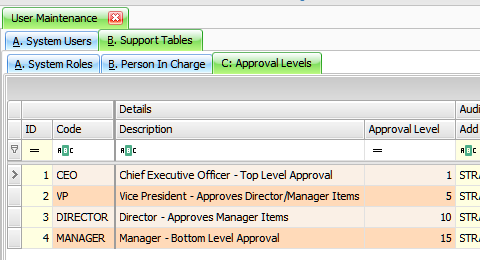
Documentation for this tab is available in the User Maintenance document. User Maintenance
Current Budget State – Example for Budget 2019-2020 to show All statuses.

Table Fields
??? Insert Fields
Other Components
|
Refresh |
Reloads table data to the most current version. |
|
Budget Version |
Dropdown, provides a list of potential budget versions to view/edit. Defaults to Current Budget. |
|
Show… |
Filters the data grid by one of the three options: 1) All Statuses – nothing is filtered. 2) Items That Need My Approval – only shows items that are directly at your approval level. 3) Any Item I Can Approve – shows all outstanding approval items, including those at a lower level than your approval level. |
|
Approve |
Approves selected lines and provides an opportunity to provide a comment to the submitting users. |
|
Reject |
Rejects selected lines and provides an opportunity to provide a comment to the submitting users. |
|
|
|
|
Current Comment |
Comment data regarding approval/rejection. |

Options
Add Missing Items to Selected Budget – Adds any missing entries from selected budget version by Cost Centre, Job Cost to approval batch Minimum. Security Level 4 required
Change Approver – relates to have the current approval set to a particular person (including a particular approval level)
For some reason, the person may be away or unavailable so they can re-assign the budget approval to an alternate approver
(someone who has approval at that level and has security access to that cost centre for example)
Approving Process
Use Check Box to Select Cost Centres for action
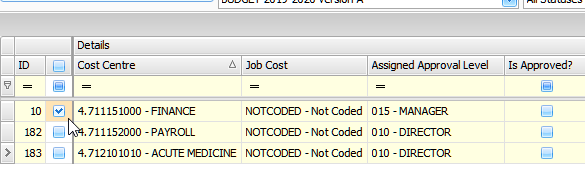

Then Click on Approve Button at Top to approve .
Enter Approval Comments – Click on OK saves Approval.

For people to show up in the Notify the Selected Users list in either Approve or Reject they need the following setup:
– Either security level <= 5 OR have that specific cost centre listed in user maintenance
– User must have an email address in their User Record.
To check email addresses: User Maintenance

If approving:
– the CC approval level must be < users’ approval level
If rejecting:
– the CC approval level must be >= users’ approval level
Or Click on Reject Button at Top to cancel approval. Use Check Box to select Users to notify.

Budget Activity – Bottom Grid
Shows a history of the approval/rejection state of the cost centre selected.

Table Fields
??? Insert Fields
Other Components
|
Comment |
Comment data regarding the historical approve/reject line selected. |